TkRose
Keith Vetter 2003-01-30 - this little program draws a rosette figure. I originally wrote it over 8 years ago for a graphics class. Mathematically, the challenge was to make the junction between lobes smooth (I believe it was to the 2nd derivative but can't remember exactly).
One thing I changed from the original version was the logic of when to draw the figure. 8 years ago computers were a bit slower and drawing a rosette figure took a few seconds. Now on my machine it's almost instantaneous. So I removed a "redraw" button and just redraw the figure whenever any of the parameters change.
KPV I tried out this program today and noticed the color toolbar was wonky--a radiobutton with -width 1 gets drawn truncated on my mac. While fixing that, I also tweaked it that it colors the interior of the figure.
uniquename 2013aug17
Here is a picture showing what the following code creates. You can click in the trough on either side of a slider-button in any of the several scale widgets --- and hold the mouse button down. The scale will auto-advance a scale-resolution-unit at a time --- and the entire image updates immediately, repeatedly --- even on my little 'weak' netbook computer.
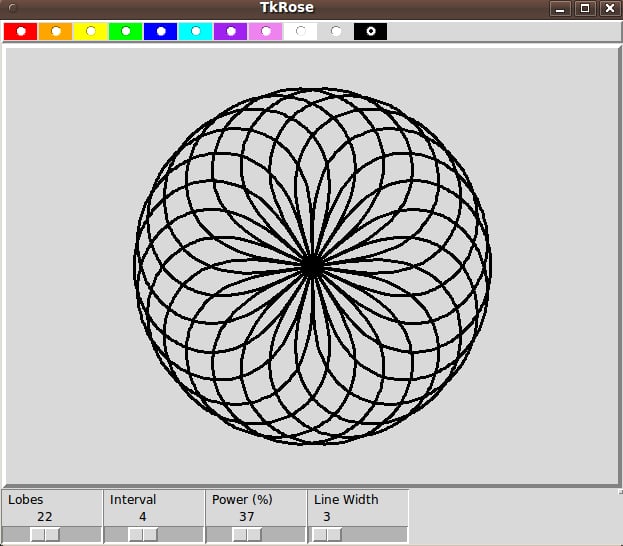
Jeff Smith 2019-04-23 : Below is an updated online demo using CloudTk
#################################################################
#
# Tkrose.tcl -- draws a rosette with various number of lobes.
# Each lobe has 2nd derivative smoothness with the next lobe.
# Keith Vetter
#
# KPV Oct 14, 1994 - original version for class UCB CS285
# KPV Jan 29, 2003 - cleaned up, rewrote display logic for faster machines
# KPV Aug 31, 2018 - fixed color toolbar, made color just for interior
#

package require Tk
array set S {lobes 12 next 2 power 100 lwidth 5 color orange}

proc DoDisplay {} {
    global S

    wm title . TkRose
    option add *Scale.highlightThickness 0
    option add *Scale.relief ridge
    option add *Scale.orient horizontal
    pack [frame .top -relief raised -bd 2] -side top -fill x
    pack [frame .bottom] -side bottom -fill x
    canvas .c -relief raised -borderwidth 4 -height 700 -width 612
    pack .c -side top -expand 1 -fill both

    set colors {red orange yellow green blue cyan purple violet magenta white}
    lappend colors [.c cget -bg] black
    ColorsToolbar .top $colors

    scale .sLobes -from 3 -to 50 -label "Lobes" -variable S(lobes) \
        -command DrawRosette
    scale .sLWidth -from 1 -to 40 -label "Line Width" -variable S(lwidth) \
        -command {.c itemconfig outline -width }
    scale .sNext -from 1 -to [expr {($S(lobes)-1)/2}] -label Interval \
        -variable S(next) -command DrawRosette
    scale .sPower -from 1 -to 100 -label "Power (%)" -variable S(power) \
        -command DrawRosette
    pack .sLobes .sNext .sPower .sLWidth -in .bottom -side left
    catch {image create photo ::img::blank -width 1 -height 1}
    button .about -image ::img::blank -highlightthickness 0 -command {
        tk_messageBox -title "About" -message "by Keith Vetter\nJanuary, 2003"}
    place .about -in .bottom -relx 1 -rely 0 -anchor ne
    update
    bind .c <Configure> DrawRosette
}
proc ColorsToolbar {w colors} {
    foreach color [UniqueColors $colors] {
        set iname "::tbar::$color"
        if {$iname ni [image names]} {
            image create photo $iname -width 32 -height 32
            $iname put $color -to 0 0 32 32
        }
        # ::ttk::radiobutton $w.$color -variable ::S(color) -value $color -image $iname \
        #     -command [list .c itemconfig rose -fill $color] -style Toolbutton
        radiobutton $w.$color -variable ::S(color) -value $color -image $iname \
            -command [list SetColor $color] -indicatoron 0
        bind $w.$color <3> [list .c config -bg $color]
        pack $w.$color -side left -fill y
    }
}
proc UniqueColors {colors} {
    set unique {}
    foreach color $colors {
        set rgb [::tk::Darken $color 100]
        if {$rgb ni $unique} {
            lappend unique $rgb
        }
    }
    return $unique
}
proc SetColor {color} {
    .c itemconfig lobe -fill $color
}
#+###############################################################
#
# DrawRosette -- routine that actually draws the rosette.
#
proc DrawRosette {args} {
    global S

    .c delete all                               ;# Erase old picture
    set cx [expr {[winfo width .c] / 2}]        ;# Center of the canvas
    set cy [expr {[winfo height .c] / 2}]
    set sc [expr {.8 * ($cx < $cy ? $cx : $cy)}];# Scaling factor
    set pow [expr {$S(power) / 100.0}]

    set n $S(lobes)                             ;# How mnay lobes
    set k $S(next)                              ;# Number of lobes over

    set beta [expr 360.0 / $n]                  ;# Center of each lobe
    set gamma [expr 180 - $k*360.0/$n]          ;# Arc area of each lobe
    set r2d [expr 3.14159/180]                  ;# Degrees into radians factor
    .sNext config -to [expr {($S(lobes)-1)/2}]

    for {set l 0} {$l < $n} {incr l} {          ;# For each lobe
        set xy [list $cx $cy]                   ;# Coordinates for the lobe
        for {set theta 0} {$theta < $gamma} {incr theta} { ;# Polar angle

            set a [expr {$theta * 180.0 / $gamma}] ;# Angle in 0-180 range
            set a1 [expr {$theta + $l*$beta - $gamma/2}]

            set r [expr {sin ($a * $r2d)}]      ;# Distance from center
            if {$pow != 1} {
                set r [expr {pow($r,$pow)}]     ;# Adjust the distance
            }
            set x [expr {$r * cos ($a1 * $r2d)}] ;# Cartesian coordinates
            set y [expr {$r * sin ($a1 * $r2d)}]

            set x [expr {$x * $sc + $cx}]       ;# Scale and shift
            set y [expr {-$y * $sc + $cy}]
            lappend xy $x $y
        }
        lappend xy $cx $cy
        .c create line $xy -fill black -width $S(lwidth) -tag outline
        .c create poly $xy -fill $S(color) -outline {} -width 0 -tag lobe
    }
    .c raise outline
}
DoDisplay
DrawRosette
return