A little stopwatch
Summary
Richard Suchenwirth 2002-04-15: This stopwatch, a small Tk example, has a Start button, a MM:SS.CC time display (CC being "centiseconds", or 1/100 of a second), and a Stop button. Precision measured in centiseconds excluded using clock format, as that is only able to render full seconds, so the time is obtained from clock clicks -milliseconds and formatted explicitly from three exprs . Clicking Start of course starts the stop-watch (and disables that button to prevent multiple event chains). Clicking Stop stops the display, to read intermediate times, but internally the clock (expressed in the global time0 variable) keeps ticking. After a second click on Stop, it is reset to 00:00.00.
Some internationalization is also demonstrated. Edit the msgcat::mclocale line to see other languages.
A starkit version of this code is available on sdarchive.
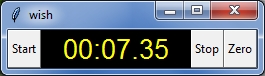
RJM2020/07/17 enhanced such that the title bar also reflects the time. This is reflected automatically to the task bar, which comes in as handy if a full size application is running as the active window. Because this arrangement results in more cpu usage, the refresh interval for the title update is increased to approx 1/3rd second. Alternatively, a child window could be created that is forced to the foreground...
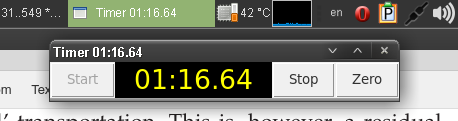
Please note that in this case the taskbar is located on the top of the display (here Linux Mint 20).
Description
#! /usr/bin/tclsh
package require Tk
option add *Button.padY 0        ;# to make it look better on Windows
option add *Button.borderWidth 1
#---------------------------------------------------- testing i18n
package require msgcat
namespace import msgcat::mc msgcat::mcset
mcset de Start Los
mcset de Stop  Halt
mcset de Zero  Null
mcset fr Start Allez
mcset fr Stop  Arrêtez
mcset fr Zero  ???
mcset zh Start \u8DD1
mcset zh Stop  \u505C
mcset zh Zero  ???
msgcat::mclocale en ;# edit this line for display language
#--------------------------------------------------------------- UI
button .start -text [mc Start] -command Start
label  .time -textvar time -width 9 -bg black -fg yellow -font "Sans 20"
set time 00:00.00
button .stop -text [mc Stop] -command Stop
button .zero -text [mc Zero] -command Zero
set state 0
bind . <Key-space> {
    if {$state} {.stop invoke
    } else {
        .start invoke
    }
}
bind . <Key-0> {
    .zero invoke
}
eval pack [winfo children .] -side left -fill y
#------------------------------------------------------- procedures
proc every {ms body} {eval $body; after $ms [namespace code [info level 0]]}

proc Start {} {
    if {$::time eq {00:00.00}} {
        set ::time0 [clock clicks -milliseconds]
    }
    every 20 {
        set m [expr {[clock clicks -milliseconds] - $::time0}]
        set ::time [format %2.2d:%2.2d.%2.2d \
            [expr {$m/60000}] [expr {($m/1000)%60}] [expr {$m%1000/10}]]
        incr ::titleskip
        if {$::titleskip >= 12} {
            wm title . "Timer $::time"
            set ::titleskip 0
        }
    }
    .start config -state disabled
    set ::state 1
}
proc Stop {} {
    if {[llength [after info]]} {
        after cancel [after info]
    }
    .start config -state normal
    set ::state 0
}
proc Zero {} {
    set ::time 00:00.00
    set ::time0 [clock clicks -milliseconds]
}
Wow - that is small!!
For everyday use, I like stopwatch written by Don Libes.
Replacing expression for computing seconds
[expr {($m/1000-$m%10)%60}]to
[expr {($m/1000)%60}]makes the seconds display work correctly.
RS: Thanks, fixed (but it looked correct before, in my tests...)
RJM: Added key bindings, bigger font & separate zeroing - allowing zeroing while still counting...
MPJ: Also see iLogWatch for a version of this that adds a logging window and the ability to save the start, stop and split times.