A Simple Multi-File Starkit Example
You can find an example of turning a simple single file hello.tcl into a Starkit under the title Build Your First Starkit. This page's tutorial takes you beyond a simple single file hello.tcl Starkit into a multi-file program hello.tcl Starkit. The code presented here was developed quickly after chatting in the Tkchat application. This example is going to show how to start without using the qwrap method. It's quite easy.
1. Create the following directory structure:
 Hello.vfs/
 Hello.vfs/lib/
Hello.vfs is where our code will go and Hello.vfs/lib is where any extensions may be placed.
2. Create the main.tcl file under the Hello.vfs directory. Let's get starkit up and running, by putting the following code into the file:
 package require starkit
 if {[starkit::startup] ne "sourced"} {
     source [file join $starkit::topdir hello.tcl]
 }
Two things are notable about the above code. The starkit::startup function must be called to initialize the starkit. It returns a value that tells you something about the running environment. Handling 'sourced' like this enables you to load the vfs into a running interpreter for interactive debugging (ie: start tkcon, source the kit file and call the program initialization functions manually). The starkit::topdir variable is initialized by starkit::startup to give the path to the top of the vfs tree. This method should always be used to find this location as it handles details on how the starkit/starpack/vfstree has been loaded.
3. Now we create our application in simple Tcl/Tk. No need to deal with or know about Starkit from here on out. We do, however, have to take special consideration during the sourcing of other files. Create this hello.tcl file under the Hello.vfs directory:
 package require Tk

 # Get the current scripts directory

 # Source in the supporting file with the current scripts
 # directory as its base

 source [file join $starkit::topdir funcs.tcl]

 # The example code

 button .hello -text "Say Hello" -command { sayHello "World" }
 pack .hello -padx 5 -pady 5 -expand 1 -fill both
4. Create the "sourced" file, funcs.tcl also in the Hello.vfs directory:
 # Supporting functions

 proc sayHello {toWho} {
         tk_messageBox -icon info -type ok -title "Saying Hello" -message "Hello, $toWho"
 }
5. Now you can wrap it with the sdx command:
sdx wrap Hello.kit
6. and run your new multi-file Starkit:
tclkit Hello.kit
Now, the nice thing about this method is that you can also develop/test/run/deploy code as a standard Tcl/Tk app as well.
wish Hello.vfs/main.tcl
or
tclkit Hello.vfs/main.tcl
or even
tkcon Hello.vfs/main.tcl
are all equivalent to running a wrapped version
tclkit Hello.kit
In the end my directory entire project structure looks like:
 HelloProject/
 HelloProject/Hello.vfs/
 HelloProject/Hello.vfs/main.tcl
 HelloProject/Hello.vfs/hello.tcl
 HelloProject/Hello.vfs/funcs.tcl
 HelloProject/Hello.vfs/lib/
At a later date (once I have it all working) I'll add in my Makefile that gives me simple commands like:
 make kit
 make exe
 make run-tcl
 make run-kit
 make run-exe
This page was created by a novice, so your milage may vary. Please, comment on this if you have further instructions or better ways of doing it.
Discussion
During July, 2010 in comp.lang.tcl the thread How to create a starpack with multiple tcl files and other packages , a discussion arose about dealing with starkits and tcl modules. One of the take aways from the discussion is that code similar to
package require starkit
starkit::startup

if {[package vsatisfies [package require Tcl] 8.5]} {
     ::tcl::tm::path add [file join $starkit::topdir lib]
}

starkit::autoextend [file join $starkit::topdir lib tcllib]
starkit::autoextend [file join $starkit::topdir lib tklib]
package require appwits
(where appwits is a package included in the starkit) should be included the starkit's main.tcl.
2013 hae I tried this. And it does not work. When starting the wrapped application I get an error dialog:
U:/lib/xx/myapp.exe/lib is ancestor of existing module path U:/lib/xx/myapp.exe/lib/tcl8/site-tcl.
To solve this I created a directory myapp.vfs/lib/tcl8/site-tcl and put the modules in there.
Zipguy 2013-Oct-07 - hae I agree with you. I tried it because I thought it might make my startkit smaller, and remove the hassle of finding built-in commands like base64 for example.
I had a version of gif2base64.tcl, which I had converted to a startkit, had copied the base64 folder into it, had it running, and added a lot more to it. It is available at Creating image photo data from GIF files.
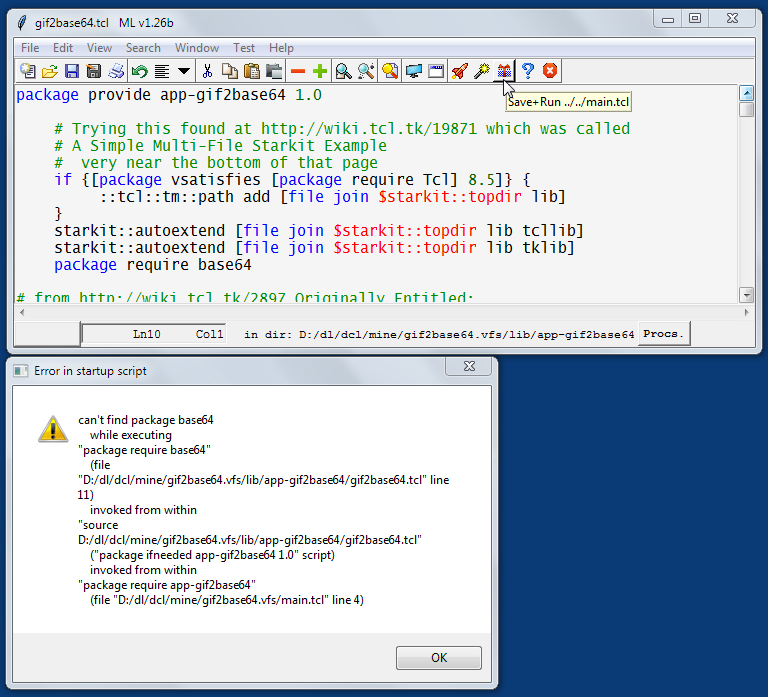
I thought wow, if it worked it would be real good to have ALL the commands in tcllib available to a tclkit. Alas, I ran it from MLv1.26b which tested it, and it did not. Dang! It looked like this:
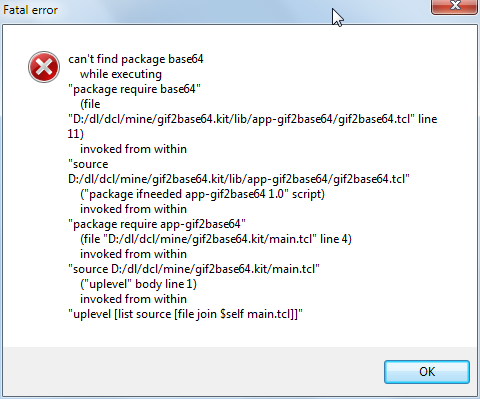
So I thought, hmmm...., maybe because it was not wrapped again. So I tried ezsdx - a small frontend for sdx to "Wrap & Run" it, but alas, that did not work either. Dang! It looked like this:
If I had a genie grant me many wishes, I would really wish it had worked.