Shaded text on canvas
Richard Suchenwirth 2005-11-15 - Here's a simple effect to make canvas text items look nicer: the text is drawn twice, slightly shifted by a pixel in x and y direction. The font used should best be not the regular small one.
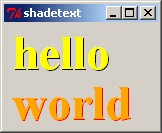
package require Tk

proc shadedtext {w x y fg bg args} {
    $w create text $x $y -fill $bg {*}$args
    $w create text [incr x -1] [incr y -1] -fill $fg {*}$args
}

## Demo:
pack [canvas .c]
shadedtext .c 10 30 yellow black -text hello -font {Times 36 bold} -anchor w
shadedtext .c 10 80 orange red -text world -font {Times 36 bold} -anchor w
UK I found a shift of two pixels nicer looking.
And you can have it even more fancy with a third level colored in the canvas bg-color layered in between:
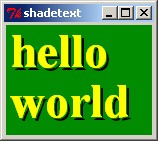
proc shadedtext3 {w x y fg bg args} {
    set cbg [ $w cget -bg ]

    $w create text $x $y -fill $bg {*}$args
    $w create text [incr x -2] [incr y -2] -fill $cbg {*}$args
    $w create text [incr x -1] [incr y -1] -fill  $fg {*}$args
}
ZB - the most attractive effect (IMHO) would be just keeping shift=2, but if one could in addition apply blur effect to that dark background layer text. But I'm not sure (yet), how is a simple way to blur it.
KPV I discovered accidentally that you can get a very nice embossed look by swapping the ordering of the last two create text in shadedtext3.
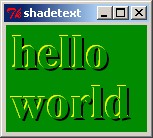
proc EmbossedText {w x y fg bg args} {
    set cbg [ $w cget -bg ]

    $w create text $x $y -fill $bg {*}$args
    $w create text [expr {$x -3}] [expr {$y -3}] -fill  $fg {*}$args
    $w create text [expr {$x -2}] [expr {$y -2}] -fill $cbg {*}$args
}
## DEMO
pack [canvas .c -bg green4]

EmbossedText .c 10 30 yellow black -text hello -font {Times 36 bold} -anchor w
EmbossedText .c 10 80 yellow black -text world -font {Times 36 bold} -anchor w