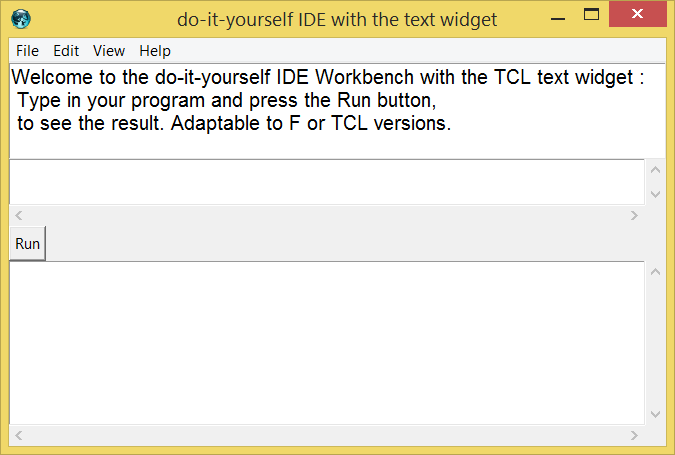
A do-it-yourself IDE with the text widget
Arjen Markus (22 april 2004) I wanted to prove a point regarding a compiled language like Fortran 95 (or the derived language F, which is a safe subset enforcing a lot of "good programming practices").
The script below presents a simple main window with an editor for text and code (you can mix them freely without having to worry about proper comments and the like (that is taken care of automatically). You can hide the text if you want. And you can run the program that you edited - without having to worry about makefiles or projectfiles or what not.
It really is a kind of literate programming.
The script I present here is stripped down, so that it will run Tcl scripts instead of Fortran programs. The things that are most interesting however is how you can exploit the text widget for this! Some things are less intuitive, but it really is a pleasure to work with it.
 # fshow.tcl --
 #    A simple user-interface to the F compiler,
 #    just to show that such things can be done in
 #    what is essentially an OS-independent way
 #

 # showMain --
 #    Show the main window
 # Arguments:
 #    None
 # Result:
 #    None
 # Side effect:
 #    The main window is filled
 #
 proc showMain {} {

    #
    # Set up the (simple) menu bar
    set  mw    .menu
    menu       $mw
    menu       $mw.file  -tearoff false
    menu       $mw.edit  -tearoff false
    menu       $mw.view  -tearoff false
    menu       $mw.help  -tearoff false

    $mw add cascade -label File   -menu $mw.file
    $mw add cascade -label Edit   -menu $mw.edit
    $mw add cascade -label View   -menu $mw.view
    $mw add cascade -label Help   -menu $mw.help

    . configure -menu $mw

    #
    # Set up the "File" menu
    #
    $mw.file add command -label New -underline 0 \
       -command [list NewFile .tedit]
    $mw.file add command -label Open -underline 0 \
       -command [list OpenFile .tedit 1]
    $mw.file add separator
    $mw.file add command -label Save -underline 0 \
       -command [list SaveFile .tedit 0]
    $mw.file add command -label "Save as ..." -underline 1 \
       -command [list SaveFile .tedit 1]
    $mw.file add separator
    $mw.file add command -label Exit -underline 1 \
       -command ExitGui

    #
    # Set up the "Edit" menu
    #
    $mw.edit add command -label "Insert text" -underline 0 \
       -command [list InsertBlock .tedit Text]

    $mw.edit add command -label "Insert code" -underline 0 \
       -command [list InsertBlock .tedit Code]

    #
    # Set up the "View" menu
    #
    set ::hidden 0
    $mw.view add checkbutton -label "Hide text" -underline 0 \
       -variable ::hidden -onvalue 1 -offvalue 0 \
       -command [list ShowHide .tedit]

    #
    # Set up the "Help" menu
    #
    $mw.help add command -label Overview -underline 0 \
       -command ShowHelp
    $mw.help add command -label About -underline 0 \
       -command {tk_messageBox -message "Fshow - a basic IDE\nBy Arjen Markus"}

    #
    # Set up the rest of the user-interface
    #
    text   .tmessage -bg white -fg black -height 4 -font "Helvetica 12"
    ScrolledText .tedit   16 normal
    ScrolledText .toutput 8 disabled
    button .run   -text Run   -command {RunProgram .tedit .toutput}
    button .clean -text Clear -command {CleanOutput .toutput}

    grid .tmessage -sticky news
    grid .tedit    -sticky news
    grid .run      -sticky w
    grid .toutput  -sticky news

    grid columnconfigure . 0 -weight 1
    grid rowconfigure . 1 -weight 1

    FillMessage .tmessage
    OpenFile    .tedit 0
    CleanOutput .toutput
 }

 # FillMessage --
 #    Fill the message window with some useful text
 # Arguments:
 #    name      Name of the widget to fill
 # Result:
 #    None
 # Side effect:
 #    Text widget filled
 #
 proc FillMessage {name} {
    $name insert end \
 "Welcome to the F workbench:
 Type in your F program and press the Run button,
 to see the result."
    $name configure -state disabled
 }

 # CleanOutput --
 #    Clean the output window
 # Arguments:
 #    name      Name of the widget to clean
 # Result:
 #    None
 # Side effect:
 #    Text widget cleaned
 #
 proc CleanOutput {name} {
    $name.text configure -state normal
    $name.text delete 1.0 end
    $name.text configure -state disabled
 }

 # ShowOutput --
 #    Show output in the output window
 # Arguments:
 #    name      Name of the output widget
 #    text      Text to be shown
 # Result:
 #    None
 # Side effect:
 #    Text updated
 #
 proc ShowOutput {name text} {
    $name.text configure -state normal
    $name.text insert end $text
    $name.text configure -state disabled
 }

 # ScrolledText --
 #    Create a scrolled text widget
 # Arguments:
 #    name      Name of the widget (public)
 #    height    Height in lines
 #    state     Initial state
 # Result:
 #    None
 # Side effect:
 #    Text widget and scrollbar created
 #
 proc ScrolledText {name height state} {
    set tf [frame $name]
    set tw "$name.text"
    scrollbar $tf.scrollx -orient horiz -command "$tw xview"
    scrollbar $tf.scrolly               -command "$tw yview"
    text      $tw         -yscrollcommand "$tf.scrolly set" \
                          -xscrollcommand "$tf.scrollx set" \
                          -font "Courier 10" \
                          -fg black -bg white \
                          -height $height \
                          -state  $state

    grid      $tw         $tf.scrolly
    grid      $tf.scrollx x
    grid      $tw         -sticky news
    grid      $tf.scrolly -sticky ns
    grid      $tf.scrollx -sticky ew

    grid columnconfigure $tf 0 -weight 1
    grid rowconfigure    $tf 0 -weight 1

    # Quick hack: tags
    $tw tag configure Text -font "Helvetica 10" -background lightgrey
    $tw tag configure Code -font "Courier 10"
    $tw tag configure Anchor -elide 1
    $tw tag configure Help -font "Helvetica 12"
 }

 # InsertBlock --
 #    Insert an empty block with the correct tags
 # Arguments:
 #    name      Name of the widget containing the program code
 #    tag       The tag to be inserted
 # Result:
 #    None
 # Side effect:
 #    Added empty lines
 #
 proc InsertBlock {name tag} {
    $name.text insert "insert linestart" " \n \n \n" $tag
    if { $tag == "Text" } {
       $name.text insert "insert linestart" "\n" {Text Anchor}

       # TODO: move the cursor
    }
 }

 # ShowHide --
 #    Show or hide the descriptive text in the edit window
 # Arguments:
 #    name      Name of the widget containing the program code
 # Result:
 #    None
 # Side effect:
 #    Shows/hides the text
 #
 proc ShowHide {name} {
    $name.text tag configure Text -elide $::hidden
 }

 # RunProgram --
 #    Run the program
 # Arguments:
 #    name      Name of the widget containing the program code
 #    outname   Name of the output widget
 # Result:
 #    None
 # Side effect:
 #    Lots
 #
 proc RunProgram {name outname} {
    global srcfile
    CleanOutput $outname
    $name.text configure -state disabled
    SaveContents $name $srcfile

 # Quick hack: make it run Tcl scripts
 #   set result [RunCompiler $srcfile $outname]
 #
 #  if { [lindex $result 0] == "OK" } {
 #     ExecProgram [lindex $result 1] $outname
 #  }
 #  $name.text configure -state normal

    ExecProgram $srcfile $outname
    $name.text configure -state normal
 }

 # RunCompiler --
 #    Run the compiler
 # Arguments:
 #    srcfile   Name of the source file
 #    outname   Name of the output widget
 # Result:
 #    None
 # Side effect:
 #    Compiler is run, error messages (if any) are caught
 #
 proc RunCompiler {srcfile outname} {
    global fcommand
    global fcmp
    global extexe

    set exefile "[file rootname $srcfile]$extexe"
    set rc [catch {
       eval $fcommand $srcfile -o $exefile
    } msg]

    if { $rc != 0 } {
       ShowOutput $outname $msg
       return "Error"
    } else {
       return "OK $exefile"
    }
 }

 # ExecProgram --
 #    Actually run the program
 # Arguments:
 #    exefile   Name of the executable file
 #    outname   Name of the output widget
 # Result:
 #    The string "OK" or "Error" - not used right now
 # Side effect:
 #    The program is run, output to screen (if any) is caught
 #
 proc ExecProgram {exefile outname} {
    set rc [catch {
       set output [exec tclsh $exefile]
    } msg]

    if { $rc != 0 } {
       ShowOutput $outname $msg
       return "Error"
    } else {
       ShowOutput $outname $output
       return "OK"
    }
 }

 # ExitGui --
 #    Exit the GUI
 # Arguments:
 #    None
 # Result:
 #    None
 # Side effect:
 #    The user-interface stops (maybe save the source?)
 #
 proc ExitGui {} {
    exit
 }

 # NewFile --
 #    Clean the input window (start with a new file)
 # Arguments:
 #    name      Name of the input window
 # Result:
 #    None
 #
 proc NewFile {name} {
    $name.text delete 1.0 end
 }

 # OpenFile --
 #    Clean the input window and load in an existing file
 # Arguments:
 #    name      Name of the input window
 #    askname   Ask for a file name or not
 # Result:
 #    None
 #
 proc OpenFile {name askname} {
    global srcfile
    if { $askname } {
       set newfile \
              [tk_getOpenFile -defaultextension $::fext \
                              -filetypes [list [list "F files" $::fext] \
                                               {{All files} *}] \
                              -title "Select an existing file"]
    } else {
       set newfile ""
    }
    if { $newfile != "" } {
       set srcfile $newfile
       $name.text delete 1.0 end
       GetContents $name $srcfile
    }
 }

 # SaveFile --
 #    Save the current file
 # Arguments:
 #    name      Name of the input window
 #    askname   Ask for a new file name or not
 # Result:
 #    None
 #
 proc SaveFile {name askname} {
    global srcfile
    set newfile $srcfile
    if { $askname } {
       set newfile \
          [tk_getSaveFile -defaultextension $::fext \
                          -filetypes [list [list "F files" $::fext] \
                                           {{All files} *}] \
                          -title "Type a new name"]
    }
    if { $newfile != "" } {
       set srcfile $newfile
       SaveContents $name $srcfile
    }
 }

 # GetContents --
 #    Get the contents of the given file and add it with proper tags
 #    to the edit window
 # Arguments:
 #    name        Name of the edit window
 #    filename    Name of the file to read
 # Result:
 #    None
 #
 proc GetContents {name filename} {
    set infile [open $filename "r"]

    #
    # Read the file line by line
    #
    set current_tag "Code"
    set first       [expr {[string length $::fcomment]+1}]

    while { [gets $infile line] >= 0 } {
       if { [string first "$::fcomment <text>" $line] == 0 } {
          set current_tag "Text"
          continue
       }
       # TODO: C-like comments
       if { [string first "$::fcomment </text>" $line] == 0 } {
          set current_tag "Code"
          continue
       }

       if { $current_tag == "Text" } {
          set line [string range $line $first end]
       }

       $name.text insert end "$line\n" $current_tag
    }
    close $infile
 }

 # SaveContents --
 #    Save the contents of the edit window to the given file
 # Arguments:
 #    name        Name of the edit window
 #    filename    Name of the file to save the contents to
 # Result:
 #    None
 #
 proc SaveContents {name filename} {
    set outfile [open $filename "w"]

    #
    # Get the contents and analyse it
    #
    set src [$name.text dump -all 1.0 end]

    set current_tag "Code"

    foreach {key value index} $src {
       switch -- $key {
       "text" {
          if { $current_tag == "Code" } {
             puts -nonewline $outfile $value
          }
          if { $current_tag == "Text" } {
             puts -nonewline $outfile "$::fcomment $value"
          }
       }
       "tagon" {
          set current_tag $value
          if { $value == "Text" } {
             puts $outfile "$::fcomment <text>"
          }
       }
       "tagoff" {
          set current_tag $value
          if { $value == "Text" } {
             puts $outfile "$::fcomment </text>"
          }
       }
       default {
          # Do nothing
       }
       }
    }

    close $outfile
 }
 # main --
 #    Main code
 #
 #
 # Set up the various variables:
 # - Names of executables
 # - Path to the executables
 #
 # -- removed these parts for the benefit of the Wiki
 if { 0 } {
 set sysdir [file dirname [info script]]
 source [file join $sysdir "fshowsys.tcl"]
 source [file join $sysdir "fshowhlp.tcl"]
 if { [file exists "fshow.set"] } {
    source "fshow.set"
 }

 #
 # One final check
 #
 sanityCheck
 } ;# -- end removed

 set fcomment "#!"
 set extexe   ".tcl"
 set fext     ".tcl"
 set fcmd     "exec tclsh"
 set srcfile "runtest.tcl"

 #
 # Now set up the user-interface
 #
 showMain
Vermeil (2004-04-26) : added weights to the grid items to make them expand properly.
SS 26Apr2004: I found it very useful, btw... features I may like to see:
- Ability to have Tcl procedures handled as objects, with a fast way to select what procedure to edit (including 'toplevel')
- 4 spaces tab
- a checkbox to select if the window in the bottom should display the "stdout" output or instead the result of the evaluation of the script.
Tclsh is already a good way to hack about some code, but to have it "multi-line" is much more comfortable. Thanks for the good work!.
gold 25Nov2017, added pix with some categories.
Ref. links, Coming to Tcl/Tk from an IDE environment,IDE, IDE: from cathedral to patchwork bazaar,Tiny Tcl/Tk IDE, Category Foreign Interfaces, What features would be useful in a Tcl IDE?